 Guide
Guide 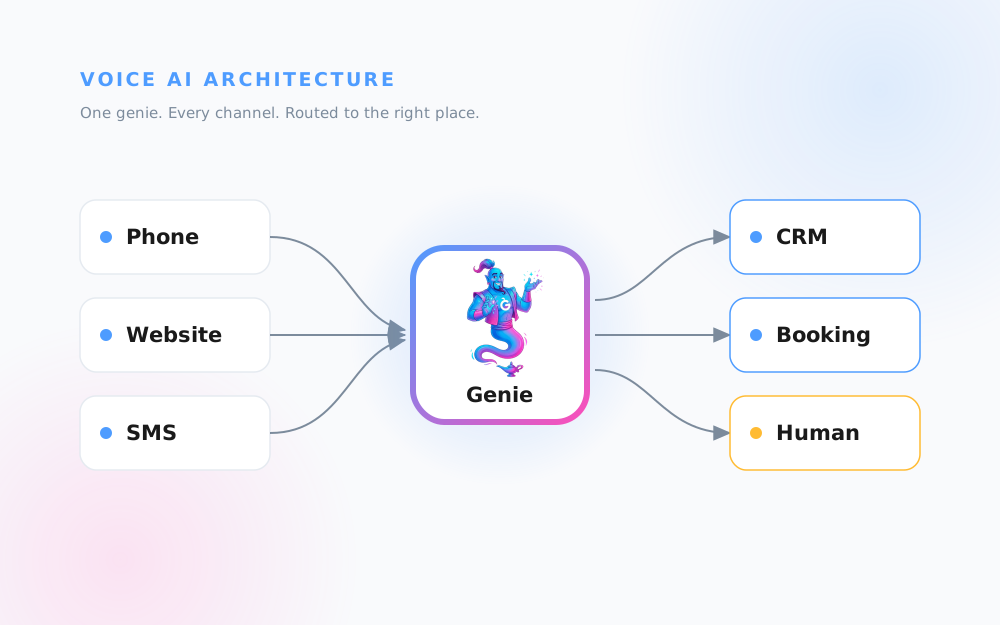
Most people picture a voice AI as a single black box that “answers the phone.” It is more useful to see it as a small system with four moving parts: where the call arrives, who owns which work, what a real day looks like, and how the data moves once a conversation ends.
I am Sam. I build these at Help Genie, and this is the mental model I give every owner before they set one up. If you understand these four frames, you understand your genie. No code, no jargon. Looking for an AI receptionist? The architecture below is what actually sits behind that phrase, and it does a lot more than answer calls.
Where the Call Goes
Your customers do not all reach you the same way. Some phone. Some type into a chat widget on your site at 11pm. Some text. The first job of the architecture is to funnel all of those into one place.
A voice AI genie sits behind a single knowledge base and a single set of rules, then answers on every channel at once. Phone, web, and SMS all reach the same genie. From there it makes a routing decision: send the caller into your CRM as a lead, into your booking system for an appointment, or straight to a human when the moment calls for one.

The point of this frame is that you are not buying three tools. You are buying one genie that meets customers wherever they show up and then routes intelligently. That is why the same setup covers a missed after-hours call and a form-shy website visitor with identical answers. You can see this in action for a specific trade over on the Discover page, where each genie is wired to the same routing logic.
What the Genie Owns and What Your Team Owns
This is the frame people worry about most, so I want to be blunt: the genie is not there to replace your team. The whole design is a split of labour, and getting that split right is what makes it work.
The genie owns the always-on, repetitive work. Answering every call on the first ring. Capturing names, numbers, and the reason for the call. Booking routine slots. Answering the same twenty questions you get every week about hours, pricing ranges, and service areas. This is the work that is easy to do and expensive to miss, and it never sleeps.
Your team keeps the judgement calls. The complex quote that needs a real look at the job. The upset customer who needs a human. The relationship a person built over ten years. The genie hands those up rather than fumbling them.

This hybrid AI and human model is the reason a genie feels like a good hire rather than a gimmick. It carries the volume so your people spend their hours on the work only people can do. When the genie hits the edge of what it knows, it does not guess. It takes a message, captures the number, and notifies a human to follow up with full context.
A Typical Day of Voice AI Coverage
Architecture is easier to trust when you map it onto a normal working day. Coverage is not one mode, it is several, and the genie moves between them without you touching anything.
Early morning and evening, it runs after-hours cover: catching the calls that used to hit voicemail and quietly leak to a competitor. During busy stretches it runs overflow: when your line is engaged, the genie picks up the second and third caller instead of leaving them on hold. Through the day it books appointments straight into your calendar. And across all of it, it answers the FAQ traffic that would otherwise interrupt someone mid-job.

Stacked over a week, those four modes are where the return comes from. After-hours and overflow are pure recovered revenue: calls you were already losing. Appointments and FAQ are recovered time: hours handed back to your team. For trades specifically, I broke the numbers down in the complete voice AI for trades guide, and the Trades and Services page shows how HVAC and plumbing businesses are running exactly this pattern.
How the Data Moves
The last frame is the one that turns a nice conversation into a business result. A call that is not recorded, routed, and followed up is a call that was still, in effect, missed.
The genie moves data through four steps. It captures the details during the conversation: who called, what they wanted, when they are free. It qualifies the caller against your rules, so an emergency is flagged and a tyre-kicker is marked as such. It notifies your team the instant it matters, by email or SMS, with the full transcript attached. And it resolves the record into your systems: a new lead in the CRM, a booked slot in the calendar, a task assigned.

Capture, qualify, notify, resolve. This is where the CRM and booking hooks earn their keep. When the genie writes a lead into your CRM, it lands as a clean record, as if one of your team typed it in while they were on the line. When a caller wants Tuesday at ten, the genie reads your calendar, offers real openings, and writes the booking back. You wake up to a filled diary and a full inbox, not a list of missed calls to chase.
Putting It Together
Four frames, one system. Calls arrive on any channel and get routed. The genie owns the repetitive volume while your team keeps the judgement. It covers a real day across after-hours, overflow, appointments, and FAQ. And it moves every conversation through capture, qualify, notify, and resolve so nothing leaks.
The fastest way to feel it is to build one. Hear It Work lets you talk to a live voice genie in under a minute so you can see the routing and data flow in a real conversation, and exactly how the four frames map to your business.
Keep exploring
Further reading and useful tools
Help Genie vs Answering Services: Cost and Coverage
Compare Help Genie's voice AI against a traditional answering service on cost, coverage, and booked jobs. An honest look at which wins for your business.
ComparisonHelp Genie vs Voicemail: What After-Hours Calls Cost You
Voicemail is the default after-hours answer for most small businesses, and it quietly loses jobs. Compare it against a voice AI genie that books the call instead.
Use CaseWhere Is My Order? A Genie That Checks Order Status Mid-Call
Parts suppliers field endless where is my order calls. See a genie check status live with Help Genie Sync, then log the call to your CRM and alert Slack.
Use CaseThe Check-In Call Nobody Has Time For, Made Every Week by a Genie
How an appliance installer uses Help Genie Outbound to call every customer a week after install, answer how-to questions and flag anyone unhappy.
BlogWe answered a lot of calls with AI. Here's what surprised us.
Tim Boyle shares what actually happened when we put voice AI into production. The results were not what we expected.
BlogManuals Are Dead. Here's What Replaces Them
Nobody reads the manual. They call and ask. Here's why your knowledge base should be something people can talk to, not scroll through.

Sam McKay
Co-founder, Help Genie
Sam McKay is a co-founder of Help Genie. He spends his days with business owners drowning in the same support questions — and building the voice AI that resolves them. He writes first-hand about what actually works when support runs itself.
Co-founded Help Genie; has deployed voice genies across trades, real estate, and hospitality businesses.
- voice AI strategy
- customer support automation
- small business operations
- multi-channel deployment