 Update
 Manage Your Voice Genies On the Go With the Mobile App
The Help Genie mobile app is here. Monitor calls, update genie settings, and manage your business from anywhere on iOS and Android.
You can now manage your voice genies from your pocket. The Help Genie mobile app is live on iOS and Android.
What’s New
The Help Genie mobile app gives you full control over your voice genies from your phone. No more waiting until you’re at a desk to check how your genie performed overnight or to adjust a setting before a busy weekend.
Here’s what you can do from the app:
- Monitor live call activity with real-time notifications when your genie handles a call, books an appointment, or captures a new lead
- Read call summaries and transcripts on the go, so you can follow up with hot leads immediately
- Update genie settings including business hours, call routing rules, and greeting messages
- Manage your knowledge base by adding FAQs, updating pricing, or marking services as unavailable
- View analytics with daily and weekly call volume, lead capture rates, and appointment booking trends
- Listen to call recordings directly from the app with playback controls
The app syncs with your web dashboard in real time. Changes you make on mobile appear on desktop instantly, and vice versa.
Why We Built It
Help Genie was built for business owners and operators who aren’t sitting at a desk all day. Plumbers are on job sites. Dentists are with patients. Property managers are walking buildings. Auto dealers are on the lot.
These are the people who need Help Genie most, and they’re the least likely to have a laptop open when their genie handles an important call.
We kept hearing the same request: “I check my Help Genie dashboard on my phone browser, but it’s clunky. I just want to see my calls and get notified when something important happens.”
The mobile app is our answer. It’s not a shrunken version of the dashboard. We redesigned the experience for mobile from the ground up, focusing on the three things business owners do most: check recent calls, follow up on leads, and adjust genie behavior on the fly.
How It Works
Getting started takes about 60 seconds:
- Download the app from the App Store (iOS) or Google Play (Android)
- Sign in with your existing Help Genie account. All your genies, settings, and history are already there.
- Enable push notifications to get real-time alerts for new calls, leads, and appointments
- Pin your most-used genie to the app’s home screen for one-tap access to its call feed
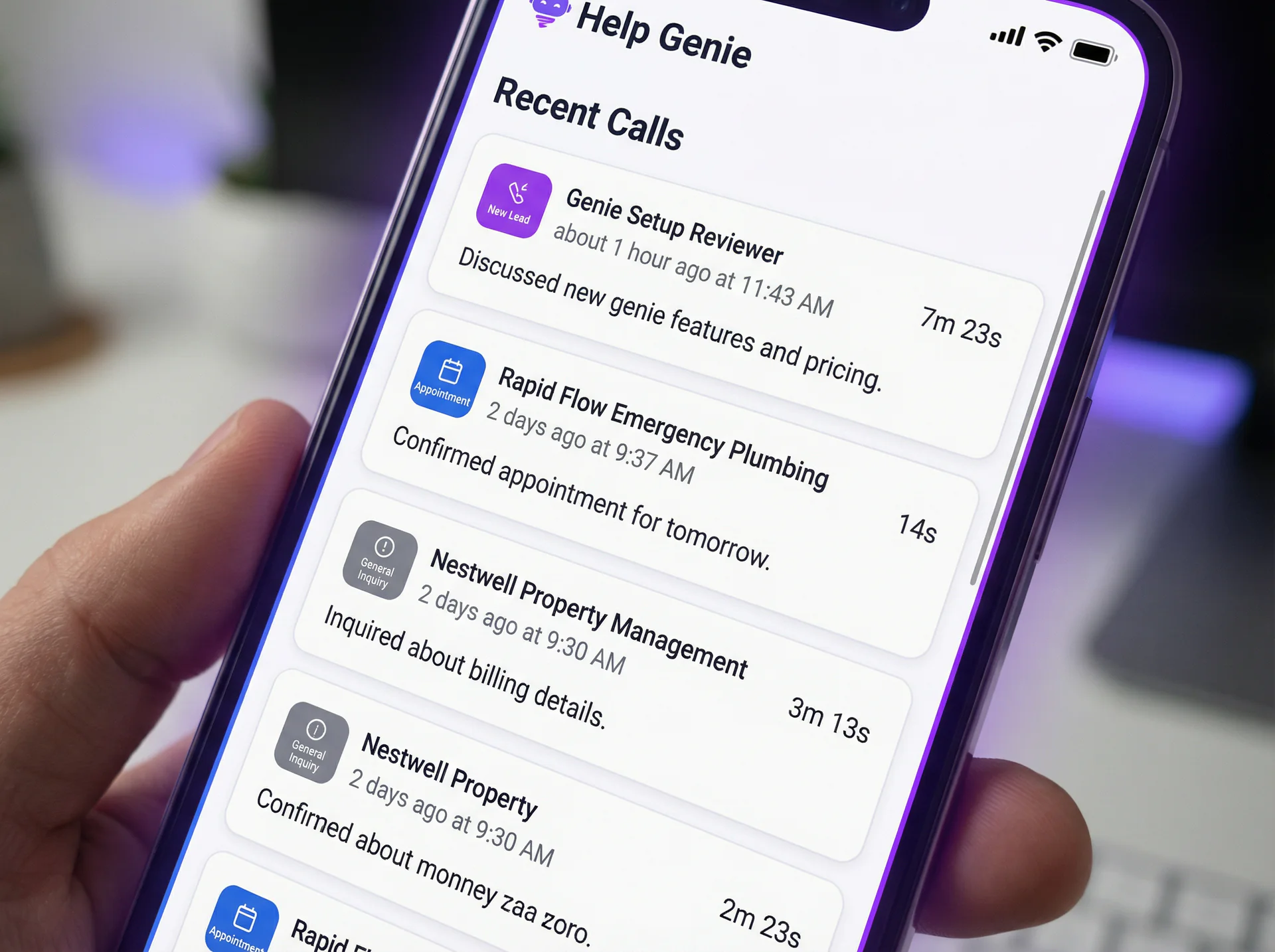
Key screens in the app:
- Call Feed shows your most recent calls across all genies, with color-coded status indicators (new lead, appointment booked, general inquiry, missed call)
- Genie Manager lets you toggle genies on/off, edit their greetings, and adjust routing rules without touching the full settings panel
- Quick Stats gives you today’s numbers at a glance: calls handled, leads captured, appointments booked, and average call duration
- Notifications Center collects all alerts with smart grouping so a busy morning doesn’t flood your lock screen with 50 separate notifications
Offline support: The app caches your most recent call data so you can review summaries even without cell service. Changes you make offline sync automatically when you’re back online.
Who Benefits Most
The mobile app is designed for anyone who manages voice genies, but it’s especially useful for:
- Trades and home services professionals who spend their days on job sites and need to follow up on leads between appointments
- Practice managers at dental and medical offices who need to monitor call handling during patient hours
- Property managers who are frequently on-site at buildings and need instant visibility into tenant calls and maintenance requests
- Small business owners who are their own receptionist, sales team, and operations manager, and need everything in one place
- Multi-location operators who manage genies across several business locations and need a unified view
What’s Next
The mobile app will get better quickly. Here’s what’s coming in the next few updates:
- One-tap callback to return missed calls directly from the call feed
- Voice commands to check your genie’s status or update settings hands-free
- Team features so office managers can assign follow-up tasks to team members from the app
The Help Genie mobile app is free for all customers. Download it now or learn more about Help Genie’s features.
Keep exploring
Further reading and useful tools
When the MSDS Answer Exists but the Folder Fails
Voice AI puts MSDS chemical safety data one question away for any worker, in any language, in the seconds that actually matter.
Use CaseOne Genie vs One Support Hire Cost Compare
See how voice AI stacks up against a full-time support hire. Multi cost compare for small business. Real numbers, real scenarios.
GuideHow to Connect Help Genie to Your CRM via Webhooks
Step-by-step guide to routing Help Genie lead captures and conversation summaries into HubSpot, Pipedrive, Salesforce, or GoHighLevel in real time.
GuideHow to Build a Knowledge Base From Your Existing Manuals
Turn your service manuals, PDFs, and FAQs into a voice AI knowledge base your genie answers from. Eight practical steps for trades, appliances, and more.
UpdateCustom Voice & Personality for Every Genie
Choose from 50+ voice options and fine-tune your genie's personality, tone, and speaking style to match your brand perfectly.
UpdateMulti-Language Support Now Live
Voice genies now handle calls in 30+ languages with automatic detection. Serve every caller in their preferred language without extra setup.

Help Genie
The Help Genie Team
The Help Genie team builds voice AI genies that resolve everyday support on their own — across phone, chat, web, and email — in your voice, 24/7. We write about what we learn shipping it to real businesses.
Building voice AI for 11+ industries, from trades to hospitality.
- voice AI
- customer support
- lead capture
- multi-channel genies